


 Posts
- How to choose a CRM for a five-person teamArrived from Rankveo todayDraft
- Email deliverability checklist for 2026Keeps its date, Sep 29Scheduled
- What a good onboarding email sequence looks likePublished Sep 12Published
site cited by 


 and rank on


The official plugin. Approved articles arrive as WordPress drafts, scheduled ones keep their date, and every sync updates the same post.
PostsSame post, updated
Edits in Rankveo update the post in place, never a copyUp to dateThe official plugin connects one WordPress site to your Rankveo workspace. Approved articles arrive as drafts, scheduled ones keep their date, and each sync updates the same post instead of creating a new one.
A native WordPress permission screen and an email code. A workspace key still works if you prefer one.
Publish again after an edit and the same post is updated. Live posts stay live, scheduled posts keep their date.
Search performance, AI visibility, backlinks, tracked keywords, and the publishing queue, in WordPress admin screens.
Best for teams that already publish in WordPress and want drafts to show up there, ready to review.
Three founders, a few months after they started using Rankveo.
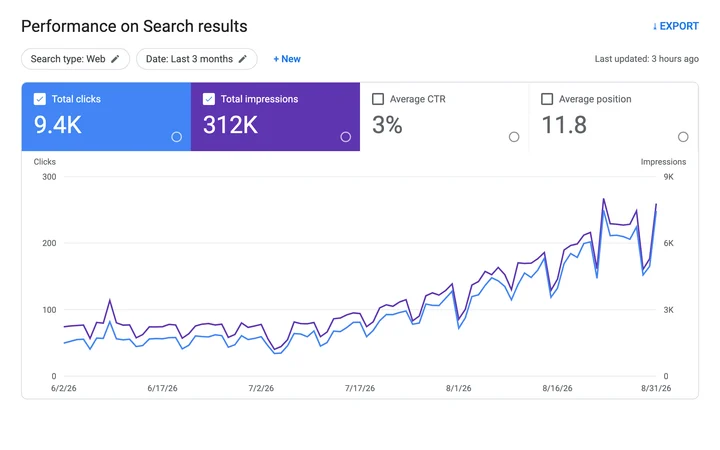
Weekly reporting for an edtech team
“I used to chase our marketer for an SEO update every Friday. Now I read the Monday email over coffee and that's it. Last week ChatGPT cited us 128 times. I didn't even know you could track that.”
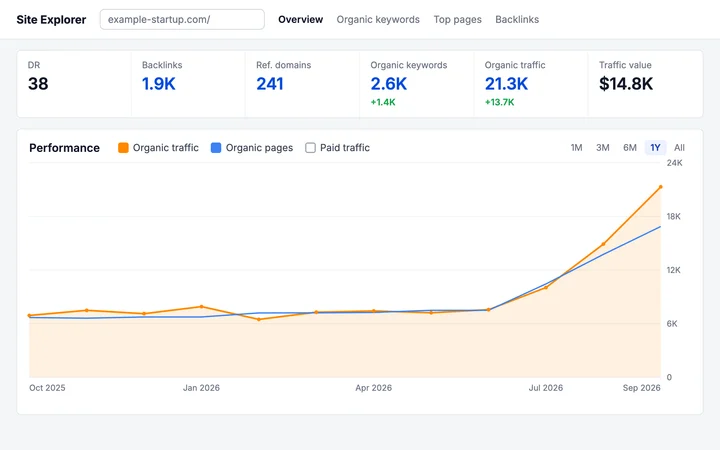
Daily publishing for an AI startup
“We sat at about 7k visits a month for most of last year. Started publishing daily in June, and by September we were at 21k. Two customers on onboarding calls said ChatGPT sent them.”
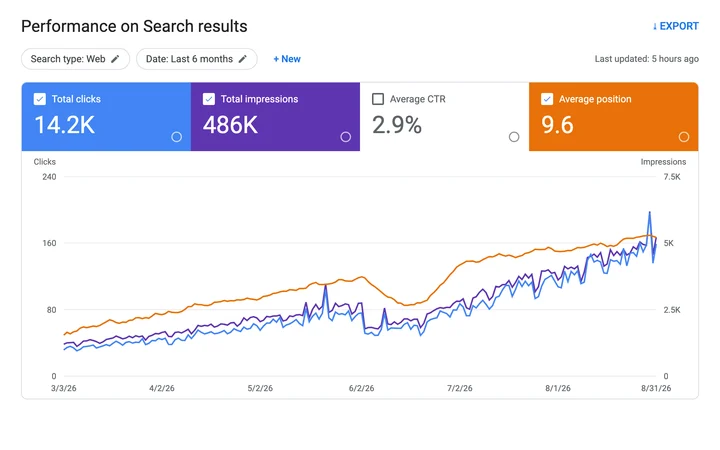
Client SEO for a product studio
“Each client blog was eating around 40 hours of my month. Now I skim the drafts, fix a line or two, and hit publish. We took on twice the clients without hiring.”
 Plans & Pricing
Start with one website, then scale your publishing and monitoring as your search presence grows.
Publish to WordPress, Shopify, Webflow, Framer, Ghost, Wix, and more through direct integrations.
Yes. Plans include between 500 and 1,000 AI visibility refreshes each month.
Yes. Move to a higher-capacity plan whenever your publishing or monitoring needs increase.
For growing companies that want higher publishing and monitoring capacity.
 20,000 AI credits 500 AI visibility refreshes 100 articles per month SEO + AI visibility tracking Content planning and publishing One paid website
Highest capacity for demanding search operations, $199 a month.
45,000 AI credits 1,000 visibility refreshes 200 articles per month 20x API and crawl capacity How it connects, what it changes on your site, and how billing works.
Approved articles as drafts, with title, slug, content, excerpt, and the target keyword stored as post meta. Scheduled articles arrive with their date and WordPress's own scheduled status.
A repeated sync updates the same post from the Rankveo version. Keep edits in Rankveo so they survive the next sync, or stop syncing an article once it is final.
No. Connection is a WordPress permission screen plus a six-digit email code. An advanced control accepts a workspace key if you would rather use one.
It shows search performance, AI visibility, backlinks, tracked keywords, and the publishing queue in wp-admin, and compresses Media Library images with restorable originals.

 Shopify An embedded Shopify app that researches what shoppers ask, drafts articles for your review, and publishes the approved ones to your store blog.
 Webflow Each approved article is served as a Webflow collection item with the field names your blog template already uses, ready for a script to post.
 Framer Framer renders the design; Rankveo supplies the articles as CMS records, one per collection item, with rich text as HTML.